Introduction
Why Integrations Fail in Power Platform Most Dataverse Integration failures are not bugs. They are architecture mismatches:
- Wrong API surface chosen
- Wrong identity model
- Chatty integrations
- Missing idempotency
- No throttling strategy
- Power Automate used for bulk sync
- Sync coupling between systems
Dataverse is a secure SaaS runtime, integration must behave as good citizen.
Dataverse Integration Options
Dataverse Web API(OData)
Best for
- REST-based integration
- Cloud-native services
- Cross-platform clients
Strengths
- Universal
- Works with any language
- Supports batching
Trade-offs
- OData query and payload constraints
- Require strong retry pattern
Dataverse SDK(.NET/ServiceClient)
Best for
- Enterprise .NET services
- More convenient abstarctions
- Batch operations via ExecuteMultiple
Strengths
- Higher-level constructs
- Mature patterns for CRUD and metadata
Trade-offs
- Runtime dependency on SDK libraries
- Still subject to service protection limits
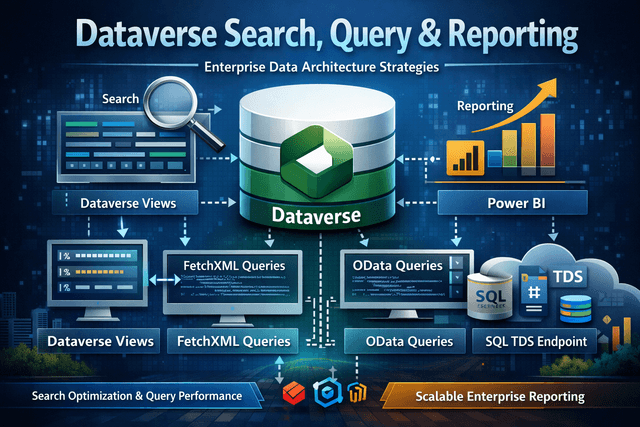
TDS Endpoint
Best for
- Read heavy scenarios where supported
- Some BI/analytics access patterns
Strengths
- Familiar SQL tooling
Trade-Offs
- Not full SQL Server
- Read only database
Power Automate Connectors
Best for
- Orchestration, approvals, notification, connector-rich integrations
Strengths
- Fast to build
- Business-friendly
Trade-offs
- Not transactional
- Throttling and retries can duplicate work
- Hard for bulk/high volume
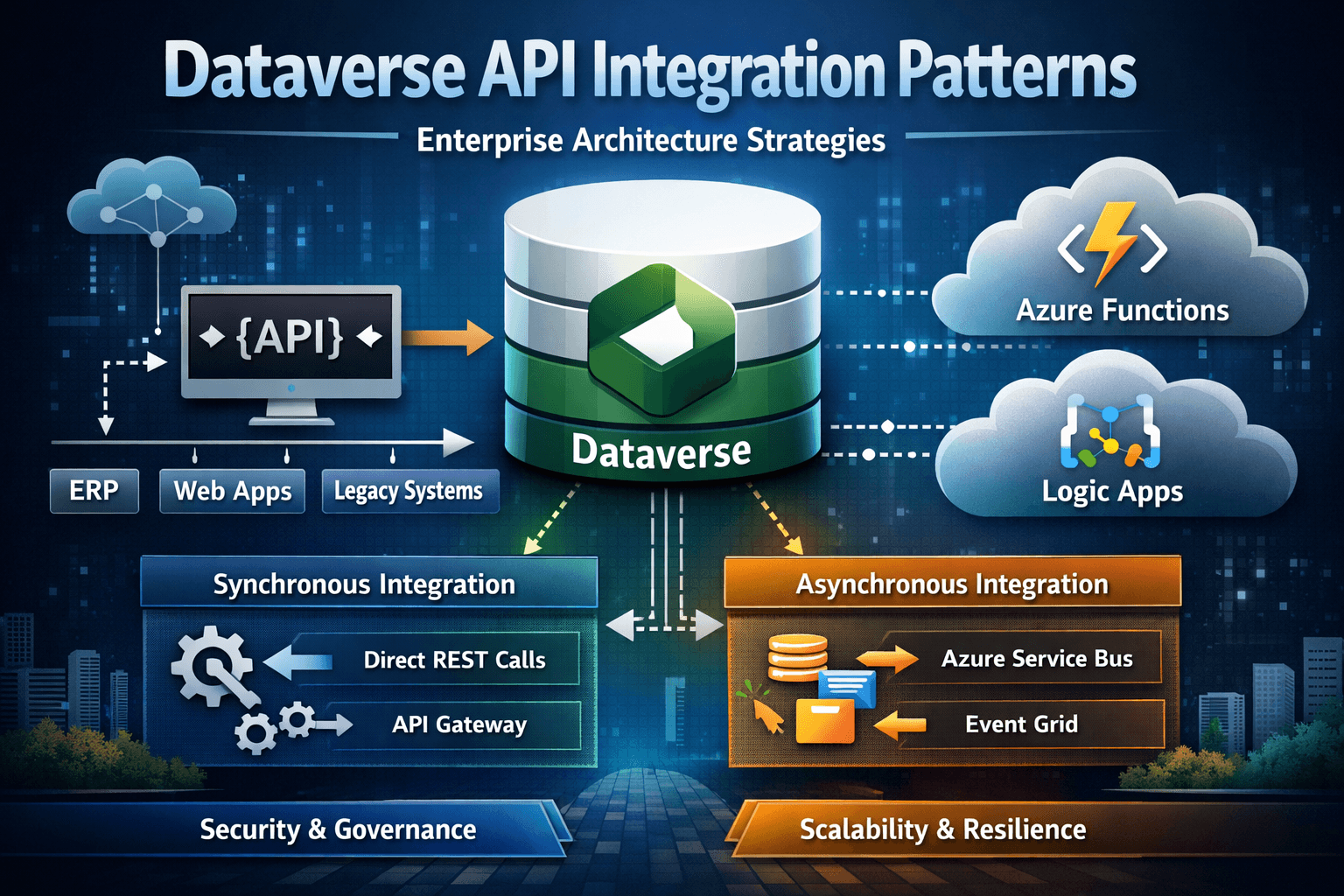
Integration Architecture Diagrams(Sync vs Async vs Event Driven)
Synchronous Integration (Tight Coupling -> High Risk)
System A -(request)->Dataverse->(response)->System A
    |
    |- Blocks business flow if dataverse is slow or throttled
Use When
- The user truly must wait for a response
- Operation volume is low and predictable
- Failure
Avoid when
- High volume
- Cross-system dependency chains
- Retries are expected
High-risk failure models
- Latency spikes
- 429 throttling breaks user transaction
- Timeouts cascade upstream
Asynchronous Integration (Decoupled - Recommended)
System A -(enqueue)->Queue/Topic->Worker->Dataverse
    |                       |
    |- User continous       |- Retries + Backoff + Idempotency
Use When
- High Volume
- Cross-system sync
- External dependencies
- Retries required
Key requirement
- Idempotency (exactly-once business effect)
Event-Driven Integration(Modern Enterprise Pattern)
Dataverse Event(Create/Update)
    |
Event Handler/Integration Layer
    |
    |- Enrich/Validate
    |- Publish downstream events
    |- Update external systems
Use when:
- Multiple downstream consumers
- You need repayability and auditing
- You want loose coupling
Common trap
- Treating events as "guranteed exactly-once"
- Not having deduplication logic
API Call Code Samples
C# (Web API via HTTPClient and Client Credentials)
using Microsoft.Identity.Client;
using System;
using System.Net.Http;
using System.Net.Http.Headers;
using System.Text.Json;
using System.Threading.Tasks;

namespace ConnectDataverseApi
{
    static async Task Main()
    {
        string resourceUrl = "https://yourorg.api.crm.dynamics.com";
        var clientId = "51f81489-12ee-4a9e-aaae-a2591f45987d";
        var redirectUri = "http://localhost";

        var authBuilder = PublicClientApplicationBuilder.Create(clientId)
            .WithAuthority(AadAuthorityAudience.AzureAdMultipleOrgs)
            .WithRedirectUri(redirectUri).Build();

        var scope = resourceUrl + "/user_impersonation";
        string[] scopes = {scope};

        AuthenticationResult token = await authBuilder.AcquireTokenInteractive(scopes).ExecuteAsync();

        var client = new HttpClient()
        {
            BaseAddress = new Uri(resourceUrl+"/api/data/v9.2/"),
            Timeout = TimeSpan(0,2,0)
        };

        HttpRequestHeaders headers = client.DefaultRequestHeaders;
        headers.Authorization = new AuthenticationHeaderValue("Bearer", token.AccessToken);
        headers.Add("OData-MaxVersion", "4.0");
        headers.Add("OData-Version", "4.0");
        headers.Accept.Add(new MediaTypeWithQualityHeaderValue("application/json"));

        var response = await client.GetAsync("WhoAmI()");
        if (response.IsSuccessStatusCode)
        {
            Guid userId = new Guid();
            string jsonContent = await response.Content.ReadAsStringAsync();
            WhoAmIResponse whoAmIResponse = JsonSerializer.Deserialize<WhoAmIResponse>(jsonContent);
            userId = whoAmIResponse.UserId;
            System.Console.WriteLine( $"UserId: {userId}") ;

        }
        else
        {
            System.Console.WriteLine($"Error: {response.StatusCode} - {response.ReasonPhrase}");
        }
    }

    public class WhoAmIResponse
    {
        public Guid UserId { get; set; }
        public Guid BusinessUnitId { get; set; }
        public Guid OrganizationId { get; set; }
    }
}
Key notes
- Use MSAL for token acquisition
- Prefer certificate over client secret
- Always implement 429/5xx with backoff
JavaScript (Browser/SPA using fetch)
const config = {
   baseUrl: process.env.BASE_URL,
   clientId: process.env.CLIENT_ID,
   tenantId: process.env.TENANT_ID,
   redirectUri: process.env.REDIRECT_URI,
};

const msalConfig = {
    auth: {
        clientId: config.clientId,
        authority: `https://login.microsoftonline.com/${config.tenantId}`,
        redirectUri: config.redirectUri,
    },
    cache:{
        cacheLocation: "sessionStorage",
        storeAuthStateInCookie: false,
    }
}

const msalInstance = new msal.PublicClientApplication(msalConfig);

async function getToken() {
    const request = {
        scopes: [config.baseUrl+"/.default"],
    };
    try{
        const response = await msalInstance.acquireTokenSilent(request);
        return response.accessToken;
    }
    catch(error){
        if(error instanceof msal.InteractionRequiredAuthError){
            const response = await msalInstance.acquireTokenPopup(request);
            return response.accessToken;
        }
        else{
            console.error("Token acquisition failed:", error);
            throw error;
        }
    }
}

async function whoAmI() {
    const token = await getToken();
    const request = new Request(`${config.baseUrl}/api/data/v9.2/WhoAmI`, {
        headers: {
            Authorization: `Bearer ${token}`,
            "Content-Type": "application/json",
            Accept: "application/json",
            "OData-MaxVersion": "4.0",
            "OData-Version": "4.0",
        }
    });
    const response = await fetch(request);
    if(!response.ok){
        throw new Error(`API call failed with status ${response.status}`);
    }
    return response.json();
}
Key notes
- MSAL.js is used with node.js
- Client side call inherit user context
- Avoid large queries from browser
Postman Pattern
Request
- Method: GET
- URL: /api/data/v9.2/$metadata#accounts(name,revenue,address1_city)
- Headers:
- Authorization: Bearer
- Accept: application/json
- OData-MaxVersion: 4.0
- Odata-Version: 4.0
Best practice
- Use postman to validate
- identity context
- security trimming
- response payload
- throttling behavior
Throttling & Backoff Template
What Throttling Means
Throttling is not an error, it's a platform protection. Common throttling responses:
- 429 Too Many Requests
- Sometimes 503 Service Unavailable during load
Retry Strategy
Retry
- 429
- 502/503/504 (transient)
- network timeouts
Do not retry blindly
- 400 (bad request)
- 401/403 (auth/permission)
- 409/412 (conflict) unless you know what is being done
Backoff Template(Pseudo Logic)
attempt = 0
delay = baseDelayMs

while attempt < maxAttempts:
    response = callDataverse()

if success:
    return

if response is 429 or transient 5xx:
    wait(delay + jitter)
    delay = min(delay*2, maxDelay)
    attempt++
    continue
else:
    fail fast(non-retryable)
Architect Rule Backoff must include jitter to avoid synchronized retries causing a thundering herd.
Idempotency Template
To avoid duplicates when retries happen:
- Use alternate keys for upserts, or
- Use a request-id stored on target record
Pattern
- Integration sends ExternalRequestId
- Dataverse stores it
- Next retry checks if already processed
Batching & High Volume Scenarios
Batching Concepts
- Web API: $batch
- SDK: ExecuteMultiple
Why batching matters:
- Reduces network overhead
- Reduces round trips
- Makes throttling less likely
Web API $batch
Batch Request
    |- Create Account
    |- Create Contact
    |- Update Opportunity
    |- Upsert Custom Table
Important:
- Batches can partially succeed
- You must handle per-operation response
- Still subject to service protection limits
Multitasking/Parallelism
Bad Pattern - Unbounded Parallel Calls
- 1000 parallel requests from a worker
- no concurrency limit
- immediate retries
Result : throttling spiral and outages
Good Pattern - Controlled Concurrency
- Limit Parallelism
- Use queues
- Use backoff and jitter
- Use idempotency
Bulk Data Sync Patterns
Pattern A- Nightly Batch (Safe)
- Export incremental changes
- Process in batches
- Upsert using alternate keys
Pattern B- Never Real Time (Safe if Designed)
- Capture events(create/update)
- Publish to queue
- Worker processes with retries and idempotency
Pattern C - "Flows looping through 100k records" (Avoid) Power Automate loops at scale often cause:
- API throttling
- run timeouts
- duplicate processing
- hard-to-debug failures
Integration Design Guardrails
Do
- Use service principals/managed identities for system integrations
- Use idempotency keys for all async work
- Use batching for volume
- Use controlled concurrency
- Seperate authoritative writes from notification
Don't
- Build chatty integrations
- Use synchronous calls for high volume workloads
- Rely on Power Automate for bulk ETL
- Treat retries as safe without deduplication
- Assume Dev load behavior matches Prod
Summary
Dataverse integration success require:
- Correct API surface selection
- Correct identity model
- Retry and backoff with jitter
- Idempotency (always)
- Controlled concurrency and batching
- Avoiding tight synchronous coupling for enterprise workloads