Introduction
Power Platform enables logic in multiple layers. That flexibility creates a common failure pattern. Logic gets implemented in the wrong layer, leading to data integrity issues, performance problems, unreliable automation and unmaintainable solutions. This article defines where each kind of logic belongs, what executes when and how to recover when it breaks.
Dataverse Execution Pipeline
Client/UI/API
  |
Security check
  |
PreValidation (Plugins)
  |
PreOperation (Plugins) - within transaction
  |
Core Operation (Create/Update/Delete)
  |
PostOperation (Plugins) - within transaction
  |
Commit
  |
Async Post-Commit:
  - Async Plugins
  - Async Workflows (legacy)
  - Power Automate triggers (eventual)
  - Azure integrations (pattern-dependent)
Pre/Post Operation (sync) are the only places we can reliably enforce transactional integrity. Anything post-commit is eventually consistent by nature.
Detailed Pipeline View
Stage 10: PreValidation
  - Validate inputs
  - Block early with clear error
  - No DB transaction

Stage 20: PreOperation (Transactional)
  - Modify target before save
  - Enforce business rules
  - Set default values safely

Stage 30: PostOperation (Transactional)
  - React to saved record
  - Create/update related records
  - Still in transaction

Stage 40: Async PostOperation (Non-transactional)
  - Long-running work
  - Integrations
  - Notifications
  - Retry-friendly operations
If the business rule must be true at the moment data is saved, it belongs in Preoperation sync plug-in (or Custom API if invoked explicitly)
Comparison Table (Execution Order and Pros/Cons)
Business Logic Options
| Mechanism | Executes Where | Typical Trigger | Execution Order | Pros | Cons | Best For |
|---|---|---|---|---|---|---|
| Business Rule | Client + Server(limited) | Form events + limited server evaluation | Usually before save UI,server eval varies by scenario | Fast, no-code, easy | Not reliable for complex server enforcement; limited capabilities | Simple field validation/defaults |
| Javascript (Form) | Client | Form load/change/save | Before save(client), can block save | Great UX control, immediate ffedback | Not server-enforced; bypassable via API/integration | UI behavior, form logic |
| Plugin (Sync) | Server | Dataverse message pipeline | In-transaction(Pre/post Operation) | Strong integrity, consiostent across UI/API | Performance risk if heavy, needs ALM discipline | Validation, invariants, transactional updates |
| Plugin (Async) | Server | Post-commit | After commit | Safer for long work; retryable patterns | Eventual consistency; delayed user-visible effects | Notifications, integrations, enrichments |
| Custom API | Server | Explicit invocation | Executes when called; can be transactional | Strong contract, reusable, explicit entrypoint | Requires dev discipline; still must manage performance | Complex business operations, "commands" |
| Legacy Background Workflow (Dataverse Process) | Dataverse Async Service | Record Create / Update / Status Change / On-demand | Can be sync or async | No 2-min sync limitLow-codeTransaction safe (runs post-commit)Retries via system job | Slower executionLimited debuggingNot future-facing (Power Automate preferred)Performance impact at scale | Simple background automationBusiness logic without codeLow-medium volume processing |
| Custom Workflow Activity (.NET extension of workflow) | Dataverse Sandbox (Async Service) | Invoked inside workflow step | Runs inside workflow execution (async) | Extend workflow with custom logicReusable activityStructured inputs/outputs | Sandbox limits applyNo fine-grained pipeline controlHarder to maintainLegacy architectureNot ideal for heavy compute | Small custom business rules inside legacy workflow |
| Power Automate | Cloud | Event triggers or manual | Async, post commit | Great for orchestration and connectors. ALM friendly and cofig seperation if made solution aware | Throttling, retries cuase duplication risk, not transactional | Orchestration, approvals, notifications, integrations |
Exceution order reality
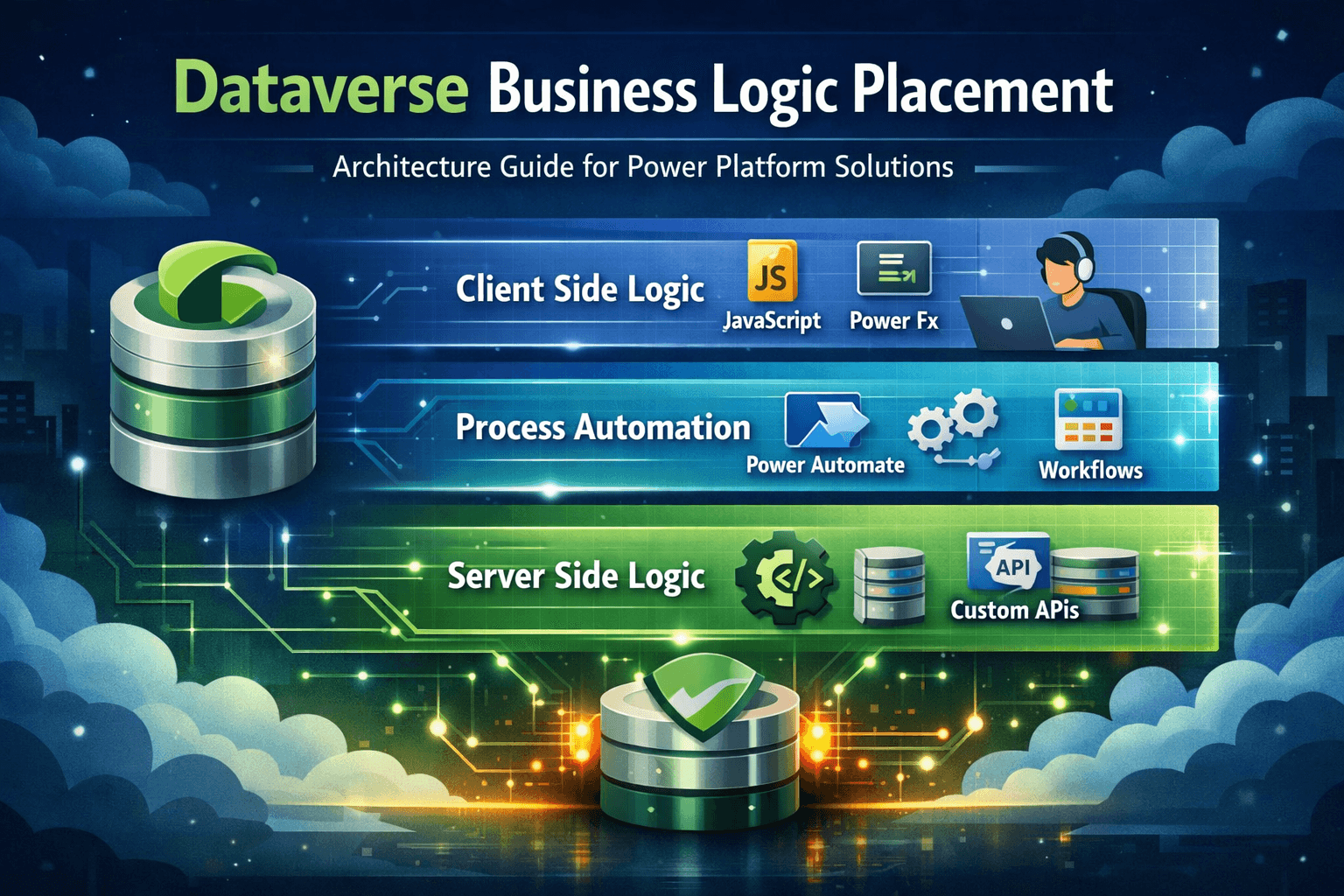
- Client(Business Rule/JS): before save but bypassable
- Server transactional(Sync plugin/Custom API/Azure Webhook/Workflow): authoritative enforcement
- Post commit(Flows/Async plugins): orchestration & side effects
Decision Matrix
| Requirement | Choose | Why |
|---|---|---|
| Must enforce data integrity at save time | Sync plugin (Preoperation) | Transactional,consistent across UI/API |
| Must run long-running work(seconds/minutes) | Async plug-in or Power Automate | Avoid blocking transaction/UI |
| Needs lots of SaaS connectors/approvals | Power Automate | Best integration/orchestration surface |
| Needs explicit business operation | Custom API(+ optional plugins behind it) | Clear contract, reusable command model |
| Needs immediate UI feedback(hide/show/validate) | Javascript+Business Rule | Best user experience |
| Must be callable from multiple clients consistently | Custom API | Standard interface for apps/integrations |
| Needs retries and resilience across systems | Power Automate(or Azure integration) | Built in retry semantics(but design for idempotency) |
| Must guarantee exactly-once updates | Sync plugin + idempotency | Flows may re-run;async can duplicate |
Architect Guidance
- Use Custom API for "business commands"
- Use Sync Plug-in for "invariants"
- Use Power Automate for "orchestration"
- Use JS/Business Rule for "UX"
Failure Recovery Playbooks
Sync Plugin Causing Save Failures
Symptoms
- Users cannot create/update records
- Errors on save, often widespread
Immediate containment
- Disable the plugin step(or reduce scope via filetring attributes)
- If managed solution:deploy emergency patch/hotfix
Root cause checks
- Recent deployment/version mismatch
- Null reference/assumption on missing tables
- Infinite loop due to update inside same message
- Unexpected excution context(different entity/message)
Hardening actions
- Add strict input validation in PreValidation
- Guard with execution depth checks
- Use filtering attributes and early exit logic
- Add robust tracing(but don't leave verbose tracing on indefinitely)
Async Plugin/Flow Duplication
Symptoms
- Duplicate records
- Duplicate notification
- Double updates in downstream systems
Immediate containment
- Pause/disable flow or async step
- Stop external side effects(connectors/webhooks) if possible
Root cause checks
- Retries and non-idempotent design
- Trigger configured on both create and update
- Concurrency settings causing race conditions
- Multiple automations doing the same job
Hardening actions
- Implement idempotency keys(alternate keys/ processed flags)
- Add "already processed?" checks
- Reduce trigger conditions
- Use controlled concurrency and retry policies
Post-commit Orchestration Delay Causes Business Break
Symptoms
- It eventually updates, but business process expects immediate results
- Users see incomplete data after save
Immediate containment
- Communicate expected delay and provide UI indicator if possible
- If truly blocking, move critical logic into sync plugin or Custom API
Hardening actions
- Split logic: invariants sync, side effects async
- Add status fields (Pending/Completed) and user messaging
- Use asynchronous patterns intentionally, not accidently
Deployment Layering Breaks Logic
Symptoms
- Works in Dev, failed in Prod
- Old behavior persists after removal
- Conflicting steps/rules
Immediate containment
- Identify which solution layer is active
- Roll back to last known good managed solution
- Remove unmanaged customizations in Prod(policy enforcement)
Hardening actions
- Strict no unmanaged in Prod
- Versioning discipline
- Component ownership and dependency mapping
- Use solution aware flows and environment variables
When Integration Causes Deadlock
Symptoms
- Save operation hangs or times out
- SQL timeout or deadlock exception surfaces in logs
- Intermittent failures under load
- Multiple related records locked during transaction
- Users report inconsistent or “random” save failures
Often appears only in higher-volume production environments.
Immediate Containment
- Disable heavy synchronous plugins calling external systems
- Move external HTTP calls to Async plugin or Power Automate
- Reduce transactional scope (avoid cross-entity writes in same transaction)
- Review long-running logic inside PreOperation/PostOperation
If deadlocks are frequent:
- Temporarily isolate high-traffic updates
- Reduce concurrency as a short-term mitigation
Root Cause Checks
- Is a synchronous plugin making an HTTP call?
- Is the plugin updating multiple related records in one transaction?
- Are two plugins updating records in opposite order (lock inversion)?
- Are bulk operations triggering complex synchronous logic?
- Is Power Automate updating records also modified by sync plugins?
Classic deadlock pattern:
Transaction A:
- Locks Record 1
- Attempts to lock Record 2

Transaction B:
- Locks Record 2
- Attempts to lock Record 1

Result → deadlock.
In Dataverse, SQL is abstracted — but transactional locking behavior still applies.
Hardening Actions
- Keep synchronous plugins minimal and deterministic
- Avoid cross-table updates in PreOperation unless absolutely required
- Move integration logic to Async stage
- Implement idempotency for external calls
- Reduce transaction size and write scope
- Avoid external API calls from sync plugins
Architectural rule:
The longer a transaction runs, the higher the probability of deadlock.
When Plugin Depth Recursion Happens
Symptoms
- Save fails with an infinite loop or depth-related exception
- Plugin executes multiple times unexpectedly
- Record updates repeatedly without user action
- Performance degradation during create/update
- Execution context Depth value increases beyond 1
- Entire transaction rolls back
Immediate Containment
- Temporarily disable the specific plugin step (not the full solution)
- Add a depth guard in code:
if (context.Depth > 1) return; - Restrict Update steps to specific filtering attributes
- Remove "All Attributes" registrations where unnecessary
- Review PostOperation steps that update the same entity
If production impact is high, unregister only the problematic step while investigating.
Root Cause Checks
- Is the plugin updating the same entity that triggered it?
- Is it registered on Update without filtering attributes?
- Is a PostOperation plugin modifying fields that retrigger Update?
- Are multiple plugins updating each other across entities?
- Is Power Automate updating the same record and causing ping-pong execution?
Common failure pattern:
PostOperation plugin updates the same record
→ Update message fires again
→ Plugin runs again
→ Recursion escalates until depth limit is hit
Depth guards prevent explosion but do not fix flawed design.
Hardening Actions
- Always use filtering attributes on Update steps
- Prefer PreOperation when modifying the target entity
- Add idempotency checks (only update if value actually changes)
- Introduce a processing flag field if necessary
- Avoid cross-layer recursion (Plugin ↔ Flow loop)
- Log Depth and CorrelationId during debugging
Architectural rule:
If your logic modifies the triggering entity, design it to execute exactly once.
Common Confusion and Technical Challenge
- Business Rules enforce server logic
- They are not substitue of server side invariants
- Power Automate is a rules engine
- It is an orchestration engine, not transactional
- Async= Safe
- Async is safer for UX, but introduces timing and duplication risks
- Custom API replaces Plugin
- Custom API is an entrypoint; enforcement still needs pipeline logic behind it
Summary
- Client logic improves UX but is bypassable
- Server transactional logic is authoritive
- Async orchestration is powerful but needs idempotency and exception management
- Custom APIs are the right tool for explicit business operation