Introduction
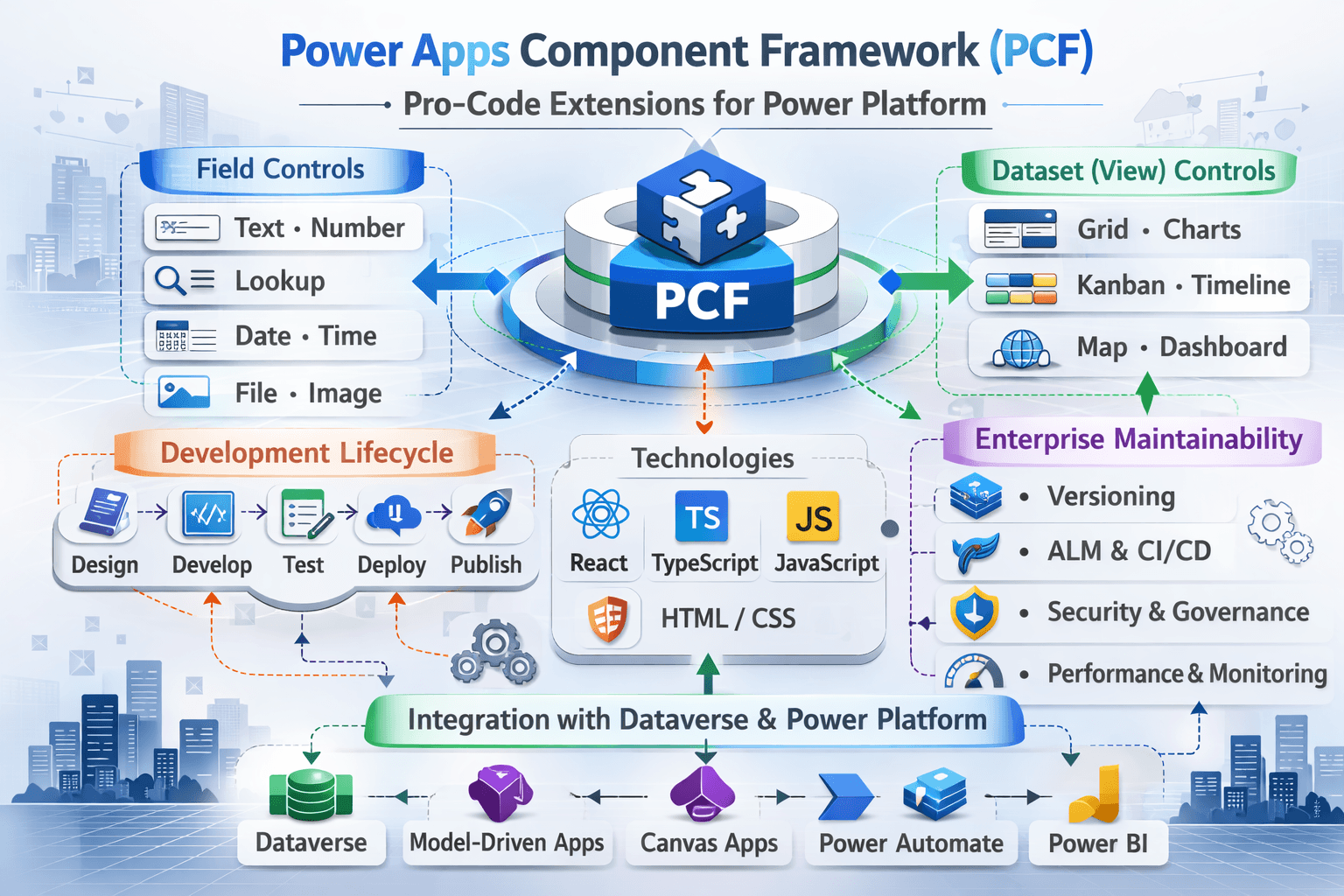
PCF is best understood as a client side component runtime hosted by Power Apps, executing under the platform's security and data constraints. PCF allows us to build custom UI components that run inside:
- Model driven forms
- Model-driven views (dataset controls)
- Canvas apps
- Power pages
PCF is not:
- A replacement for server-side logic
- A good place for "business rule"
- A free pass around Dataverse performance limits
PCF lifecycle
High-Level Lifecycle
    init() - setup, read context, create DOM
      |
    updateView() - render/update UI when data/context changes
      |
    getOutputs() - return values to platform when user changes
      |
    destroy() - cleanup listeners, timers, resources
Core reality
- updateView() can fire many times
- Poorly designed rendering causes slowness and memory leaks
- getOutputs() must be minimal and deterministic
Lifecycle with Event Triggers
Platform loads form/view
    |
init()
    |
    |- user types/ field changes
    |- form refresh/ navigation
    |- dataset paging /sorting
    |- resize / visibility changes
updateView()
    |
    |- user edits value
    |
notifyOutputChanges()
    |
getOutputs()
    |
Platform writes value/saves record (depending on control and context)
    |
destroy()
PCF Execution Boundary (Architectural Position)
PCF runs:
- On the client
- Inside the host application runtime
- Under Dataverse security
- Without direct database access
PCF cannot:
- Bypass Dataverse security
- Execute server-side transactions
- Guarantee atomic operations
Architecturally: PCF is a UI extension layer, not a business logic layer.
Field vs View Controls
Field Control
Use when
- You are enhancing the UX of one field
- Example: masked input, advanced lookup, custom picker, rich formatting
Runtime behavior
- Simple data binding
- Often interacts with context.parameters.fieldName
View/Dataset Contro;
Use when
- You need a custom experience for lists
- Example: Kanban board, calendar, custom grid, inline actions
Runtime behavior
- Works with context.parameters.datasetName and record sets
- Must handle paging, sorting, selection and performance carefully
Dataset controls are where performance problems multiply fastest
Step-by-Step: Create a PCF Control
Below is the golden path that teams use successfully in enterprise ALM.
Create the Control Project
- Install prerequisites (Node, Power Platform CLI)
- Initialize the control
- Implement the logic
- Build & test
- Package in a solution
Recommended repo structure
/pcf-controls
  /src
    /MyFieldControl
    /MyDatasetControl
  /solutions
    /YourSolution
Define a Field Control
- Control type: Field
- One bound input property (e.g value)
- Optional config properties (e.g format, maxLength)
Best Practice
- Keep input properties minimal
- Avoid "do everything" controls
Implementation Guidance
- init()
- Create DOM container
- Register event handlers
- updateView()
- Read the current bound value
- Render UI
- notifyOutputChanges()
- Call only when user changes value
- getOutputs()
- Return new value for bound field
- destroy()
- Remove event handlers, timers
Never call APIs in updateView() unless throttled/debounced
Step-by-Step: Create a PCF Control (View/Dataser Template)
Dataset Control basics
A dataset control is designed around:
- Records
- Columns
- Paging
- Sorting
- Selection
What you configure
- Control type: Dataset
- Dataset input property (e.g. MyDataset)
- Optional action parameters (e.g enable inline actions)
Rendering Loop
updateView()
  |- read dataset paging info
  |- read visible records (current page)
  |- render only visible rows/cards
  |- wire up selection and actions
Rendering Loop
updateView()
  |- read dataset paging info
  |- read visible records (current page)
  |- render only visible rows/cards
  |- wire up selection and actions
Render only what the user can see. Don't render 5000 DOM nodes
Dataset "Gotchas"
- Paging is not optional
- Sorting must be delegated to platform
- Record count can be large, but UI must remain constant-time per page
React vs Non-React Guidance
When React is a Good choice
Use React when:
- UI has complex state
- You need component reuse
- You need predictable rendering and state management
- You have an enterprise front-end practice
Pros
- Mature ecosystem
- Testable patterns
- Better maintainability for Complex UI
Cons
- Risk of excessive re-renders if poorly designed
- Bundle size concerns
- Needs disciplined performance patterns
When Non-React is Better
Use non-React (vanilla TS/DOM) when:
- Control is small and simple (formatting, lightweight input)
- Performance must be extremely tight
- You want minimal dependencies
Pros
- Small bundle
- Lower runtime overhead
- Fewer dependency upgrade risks
Cons
- Harder to scale to complex UI
- More manual state management
Enetrprise Recommendation
- Field Controls: React optional, often non-React is fine
- Dataset controls: React often helps, but only if you implement:
- memoization
- virtualization patterns
- controlled re-render strategy
When PCF Is the Wrong Choice
- When requirement is business validation (use plugin)
- When requirement is data transformation (use server)
- When requirement is integration logic (use API/flow)
- When requirement can be solved with configuration
- When UX complexity outweighs maintainability
PCF as a Technical Debt Multiplier
Each PCF control:
- Increases bundle size
- Increases upgrade surface area
- Adds dependency lifecycle
- Requires regression testing
A platform with 2 PCF controls behaves differently from one with 25.Architectural discipline determines whether PCF remains a precision tool or becomes UI fragmentation.
Most Common PCF Failures
Anti-Pattern 1 - Heavy work in updateView()
Symptom
- UI freezes
- typing lags
Fix
- Debounce expensive operation
- Cache
- render minimal diffs
Anti-Pattern 2 - Re-rendering everything on every update
Symptom
- Slow forms
- Slow grids
Fix
- Prefetch via server-side query/views
- fetxh once per page
- memoize in React
Anti-Pattern 3 - Calling Web API per row (N+1)
Symptom
- Works in dev
- dies in prod
Fix
- Prefetch via server-side-query/views
- fetch once per page
- use batching
Anti-Pattern 4 - Large bundle size and dependency sprawl
Symptom
- Slow initial load
- worse on mobile
Fix
- Minimize libraries
- tree-shaking
- Avoid huge UI frameworks unless required
Anti-Pattern 5 - Memory leaks
Symptom
- App slows after navigation
Fix
- Always remove listeners/timers in destroy
Upgrade Compatibility Strategy
PCF breaks most often due to:
- Platform runtime updates
- Dependency updates (React libraries)
- Changes in metadata/fields/views
- Browser changes
Compatibility Rules
- Version controls strictly
- Maintain a compatibility matrix
- Platform version vs control version
- Browser version
- App type (model-driven/canvas)
Release strategy
- Keep PCF in its own solution
- Promote via ALM pipeline like code
- Use staged rollout
- Dev -> Test -> UAT -> Prod
- Maintain rollback
- Re-import previous managed version
Dependency Governance
- Pin dependency versions
- Avoid frequent dependency churn
- Prefer stable, well supported libs
- Test in UAT with realistic data and devices
Regression Testing Pattern
Test each PCF release for:
- Form load time impact
- Keyboard accessibility
- Mobile behavior
- Dataset paging and sorting
- Error handling (offline/network slow)
Role-Based Perspective
Admin
- Govern which controls can be deployed
- Ensure rollback readiness (for managed solution)
- Monitor performance regressions after release
Architect
- Decide which PCF is justified
- Enforce standards:
- versioning
- testing
- rollouts
- Prevent PCF everywhere UI fragmentation
Developer
- Keep controls small and composable
- Optimize rendering and avoid N+1 calls
- Design for maintainability and backward compatibility
User
- Needs consistency and speed
- Any lag or instability drives adoption failure quickly
Summary
PCF is powerful when used intentionally
- Use it for UI extension, not business logic
- Treat updateView() as a high-frequency function
- Prefer server side logic of truth
- Control dependencies and versioning like any enterprise front-end
- Use staged rollouts with rollback plans